Why Does a Car Amplifier Go Into Protection Mode?
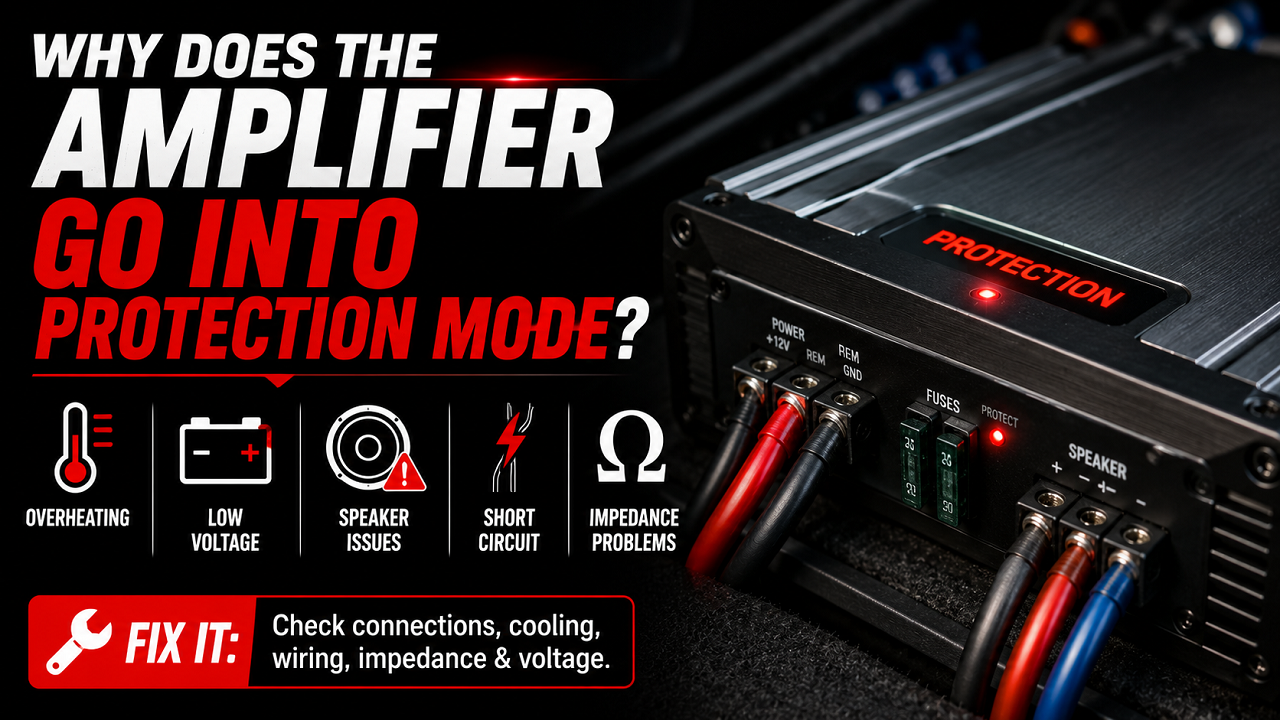
If you’re wondering why does a car amplifier go into protection mode, you’re not alone. Amplifier protect mode is one of the most common problems in car audio systems and can be caused by amplifier wiring problems, amplifier overheating, low battery voltage, damaged speakers, or internal amplifier faults. Fortunately, most issues can be identified through proper car amplifier troubleshooting, allowing you to fix the problem before it causes permanent damage to your amplifier or speakers.
What Is Amplifier Protect Mode?
Protection mode is a built-in safety feature designed to prevent expensive damage to your amplifier. Instead of continuing to operate under unsafe conditions, the amplifier automatically shuts down or disables its output whenever it detects a serious problem.
Depending on the amplifier model, you may notice:
- A red “Protect” light
- A flashing LED
- No sound from the speakers
- The amplifier turning on briefly before shutting off
- Music stopping after a few minutes
Although it can be frustrating, protect mode usually means the amplifier is doing exactly what it was designed to do—protect itself.
Why Amplifiers Enter Protection Mode
Modern car amplifiers constantly monitor several operating conditions, including:
- Battery voltage
- Internal temperature
- Speaker impedance
- Output current
- Short circuits
- Internal component faults
If any of these exceed safe limits, the amplifier enters amplifier protect mode to prevent damage to its internal circuitry.
1. Low Battery Voltage
Low voltage is one of the most common reasons an amplifier enters protection mode.
Most amplifiers are designed to operate with approximately 12 to 14.8 volts. If voltage drops too low, especially during heavy bass notes, the amplifier may shut itself down.
Common causes include:
- Weak battery
- Faulty alternator
- Loose battery terminals
- Corroded power connections
- Undersized power cable
How to fix it:
Measure battery voltage with a multimeter. With the engine running, the charging system should generally supply around 13.8 to 14.7 volts. If voltage drops significantly during loud music, inspect the battery and charging system.
2. Poor Ground Connection
A poor ground is one of the biggest installation mistakes in aftermarket audio systems.
If the amplifier cannot return current efficiently through its ground cable, voltage drops and excessive heat can develop.
Signs of a poor ground include:
- Protect mode during bass hits
- Lights dimming
- Amplifier randomly restarting
- Engine noise through the speakers
How to fix it:
- Ground directly to bare chassis metal.
- Remove all paint and rust.
- Tighten the ground bolt securely.
- Use the same cable size for power and ground.
- Keep the ground wire as short as possible.
Good grounding eliminates many amplifier wiring problems.
3. Speaker Wire Short Circuits
Damaged speaker wires can easily trigger protection mode.
If positive and negative wires touch each other or contact the vehicle’s metal body, the amplifier detects a short circuit and immediately shuts down.
Speaker wire damage may occur because of:
- Pinched wiring
- Door hinge movement
- Damaged insulation
- Incorrect installation
- Loose copper strands
Disconnect all speakers from the amplifier and reconnect them one at a time. If the amplifier works until one particular speaker is connected, you’ve likely found the faulty circuit.
4. Incorrect Speaker Impedance
Every amplifier has a minimum safe speaker load.
Connecting speakers below that rating forces the amplifier to deliver more current than it was designed to handle.
Common mistakes include:
- Wiring dual voice coil subwoofers incorrectly
- Connecting too many speakers to one channel
- Bridging the amplifier improperly
Always verify the final speaker impedance before powering up the system.
5. Amplifier Overheating
Amplifier overheating is another major cause of protection mode.
Amplifiers generate heat during normal operation, especially when producing high power for long periods. If the heat sink cannot dissipate enough heat, thermal protection activates.
Overheating is commonly caused by:
- Poor ventilation
- Mounting under carpet
- High ambient temperatures
- Low speaker impedance
- Excessive gain settings
- Continuous high-volume listening
To reduce amplifier overheating, install the amplifier where air can circulate freely and avoid covering the cooling fins.
6. Gain Set Too High
Many people mistakenly use the gain knob as a volume control.
The gain actually matches the amplifier’s input sensitivity to the head unit’s output voltage.
Excessive gain can cause:
- Clipping
- Distortion
- High operating temperatures
- Increased current draw
- Premature protect mode
The gain should always be adjusted using proper test equipment or the manufacturer’s recommended procedure.
7. Damaged RCA Cables
Faulty RCA cables can introduce noise, intermittent signals, or even short circuits.
Inspect the RCA cables for:
- Bent connectors
- Crushed wiring
- Loose plugs
- Corrosion
- Pinched insulation
Replacing damaged RCA cables is inexpensive and often resolves intermittent car amplifier troubleshooting issues.
8. Faulty Remote Turn-On Wire
The remote wire tells the amplifier when to power on.
If the remote signal is weak or intermittent, the amplifier may repeatedly turn on and off or enter protection mode.
Check:
- Remote wire voltage
- Loose terminals
- Damaged wiring
- Head unit remote output
The amplifier should receive approximately 12 volts on the remote terminal whenever the radio is turned on.
9. Blown or Damaged Speakers
A damaged speaker can overload the amplifier.
Problems include:
- Burned voice coils
- Torn speaker cones
- Internal shorts
- Loose speaker terminals
Disconnect each speaker individually until the amplifier stays out of protect mode. This helps isolate the faulty speaker.
10. Charging System Problems
Sometimes the amplifier isn’t the problem at all.
A failing alternator or weak battery may struggle to supply enough current when the music becomes demanding.
Watch for symptoms such as:
- Headlights dimming
- Battery warning lights
- Voltage dropping below 12 volts
- Protect mode only while driving
Testing the charging system is an important part of car amplifier troubleshooting.
11. Internal Amplifier Failure
If every external component checks out, the amplifier itself may have developed an internal fault.
Possible failures include:
- Burned output transistors
- Damaged MOSFETs
- Failed power supply components
- Faulty protection circuitry
- Damaged capacitors
These repairs usually require professional service.
12. Moisture or Water Damage
Water and electronics never mix.
Moisture inside an amplifier can create corrosion or short circuits that immediately activate protection mode.
Water damage often occurs because of:
- Trunk leaks
- Wet carpeting
- Flood damage
- Condensation
- Improper amplifier location
If moisture is present, disconnect power immediately and inspect the amplifier before attempting to use it again.
13. Incorrect Amplifier Installation
Even high-quality amplifiers can enter protection mode if installed incorrectly.
Common installation mistakes include:
- Loose power terminals
- Incorrect fuse size
- Reversed polarity
- Undersized wiring
- Poor cable routing
Taking time to double-check every connection often prevents unnecessary repairs.
How to Diagnose an Amplifier in Protect Mode
Follow this order when troubleshooting:
- Check battery voltage.
- Inspect the amplifier fuse.
- Verify the ground connection.
- Disconnect every speaker.
- Remove the RCA cables.
- Measure the remote wire voltage.
- Confirm speaker impedance.
- Inspect power wiring.
- Test the charging system.
- Reconnect components one at a time until the problem returns.
Working methodically helps identify the real cause instead of replacing parts unnecessarily.
How to Prevent Protection Mode
Most protect mode problems can be avoided with proper installation and maintenance.
Best practices include:
- Use the correct wire gauge.
- Install quality fuses.
- Secure all electrical connections.
- Match speaker impedance correctly.
- Set amplifier gain properly.
- Provide adequate ventilation.
- Keep the amplifier dry.
- Inspect wiring regularly.
- Maintain a healthy battery and charging system.
Preventive maintenance is usually much less expensive than replacing damaged equipment.
When Should You Replace the Amplifier?
Consider replacement only after ruling out wiring, speakers, battery, charging system, and installation issues.
Replace the amplifier if:
- Internal components have failed.
- Repair costs exceed replacement value.
- Water damage is severe.
- The amplifier repeatedly enters protection despite correct installation.
In many cases, however, amplifier protect mode is caused by an external issue rather than a defective amplifier.
Understanding why does a car amplifier go into protection mode can save both time and money. While amplifier protect mode may seem alarming, it is often triggered by common issues such as amplifier wiring problems, amplifier overheating, low voltage, incorrect speaker impedance, or damaged wiring. By following a systematic car amplifier troubleshooting process, you can identify the root cause, restore your audio system, and prevent future problems. A properly installed and maintained amplifier should provide years of reliable performance without frequently entering protection mode.
Frequently Asked Questions
Why does a car amplifier go into protection mode immediately after turning on?
Immediate protection mode usually indicates a wiring problem, speaker short, incorrect impedance, or an internal amplifier fault. Disconnect the speakers and RCA cables first to determine whether the problem is external or inside the amplifier.
Can a weak battery cause amplifier protect mode?
Yes. A weak battery or failing alternator can cause voltage to drop below the amplifier’s operating range. When this happens, the amplifier enters protection mode to prevent unstable operation and potential internal damage.
Can amplifier overheating cause protect mode?
Absolutely. Amplifier overheating is one of the most common reasons an amplifier shuts down. Poor ventilation, excessive gain settings, and low speaker impedance all increase operating temperature and may activate thermal protection.
Can bad speaker wiring trigger amplifier protect mode?
Yes. Damaged or pinched speaker wires can create short circuits that immediately activate amplifier protect mode. Inspect all speaker wiring carefully and repair damaged insulation before reconnecting the amplifier.
How do I know if my amplifier is damaged?
If the amplifier still enters protection mode after disconnecting all speakers, RCA cables, and verifying power and ground connections, it may have an internal electrical failure that requires professional repair or replacement.
Is it safe to keep resetting an amplifier in protect mode?
No. Continuously resetting an amplifier without finding the underlying cause can lead to permanent damage. Always diagnose the reason for protection mode before attempting to operate the amplifier again.
Can incorrect gain settings damage an amplifier?
Yes. Setting the gain too high increases distortion, heat, and current draw. Over time, this can contribute to amplifier overheating, speaker damage, and repeated protection mode activation.